Extras: IIS Traffic Monitor
v1.0.0.0 - June 24th 2007
Extracts per-site traffic information for IIS5 upwards from standard W3C/IIS log files using Microsoft Log Parser. No longer supported.
AS OF DECEMBER 2009, THIS SOFTWARE IS NO LONGER ACTIVELY SUPPORTED
While trying to work out which users on a server were consuming the most resources, I realised there was no easy way to see how much bandwidth an IIS website has used for a given period in time. A quick search showed plenty of commercial products that could be installed as filters to keep track of this kind of thing, but there didn't appear to be anything quick, simple and importantly, free.
So I found some source code that uses Microsoft Log Parser (also free) to interrogate the log files for each site, and come up with a number to show how much traffic has gone through a website. I packaged it up into a nice little application and that's what you see here.
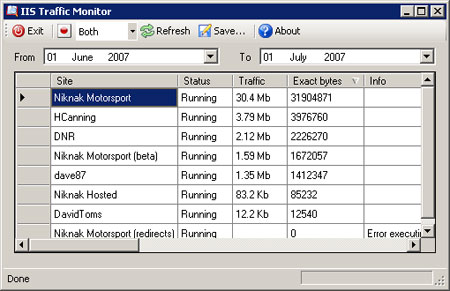
The application is very small to download, install and run, and can show you statistics for sites that are running, paused or stopped. You can select a time period to analyse, and what kind of traffic to include (sent, received or both). You can even save the results as XML.
Please note: IIS Traffic Monitor is currently not compatible with IIS7 when running without the IIS6 metabase compatibility addition.
Screenshot
How to use
Using IIS Traffic Monitor couldn't be easier...
1. Download
Click here to download the installation file in MSI format (approx. 410Kb).
2. Install
Run the installation file. If you do not already have Microsoft .NET Framework 2.0 or Microsoft Log Parser 2.2 installed you will be prompted to visit Microsoft to download and install them before continuing. Following on from there, a normal installation wizard will get the software installed and provide you with Start Menu and desktop shortcuts.
3. Run!
You can run IIS Traffic Monitor by using the Start Menu or desktop shortcuts. Click 'Refresh' to load site data. You can use the square button with a red circle to include/exclude stopped and paused sites, and the drop down list to change the type of data included. The 'Save...' button will prompt you to save the results as an XML file. The two date selection controls allow you to define the time period to show data for (the default is the current calendar month).
Source code
If you would like to make your own application for querying logs with LogParser, click here to download the source code for IIS Traffic Monitor. If you're a C# coder (as I am now), you'll unfortunately have to translate from VB.
Support
I've tested the software on several servers and so far I've not had any problems. Things to watch out for are sites without log files; when the software tries to analyse these sites you will see an error message in the 'Info' column, instead of any traffic data. Also be sure to check your logging settings - you must be recording bytes sent (sc-bytes) and bytes received (cs-bytes) for the software to work. These are not enabled by default. Everything else should be point-and-click and should cause no problems, but I cannot take any responsibility for how you use the software!
AS OF DECEMBER 2009, THIS SOFTWARE IS NO LONGER ACTIVELY SUPPORTED